Affichage des articles dont le libellé est python. Afficher tous les articles

mardi 18 mars 2014

Plotting VTK files with matplotlib and python-vtk

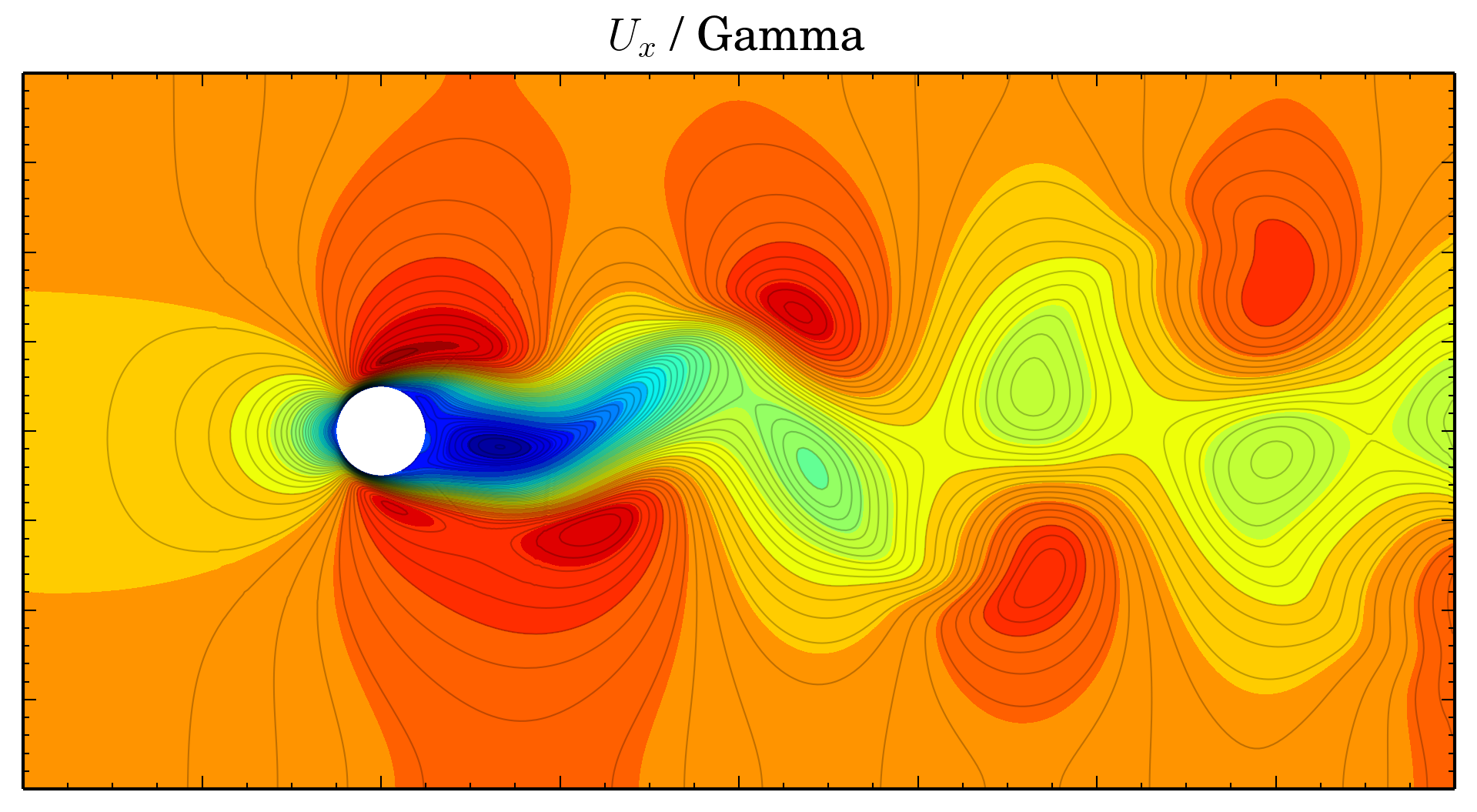
Paraview is good. But pictures produced by the software is in general raster (maybe I can't use it right but even if I build with gl2ps I can't find a way to export scene to PS or PDF). So usually I used sample utility to write a slice of interest to a RAW file, then load it with numpy and then use tricontourf to produce color map of a value. And then I can save it as a PDF (or EPS, or PS) so the figure can be scaled without quality loss.

Everything is good (though there's certain problems with matplotlib's triangulation sometimes) but in this case I had a hole in a flow field. So if I have a file with (x, y, value) tuples, the hole will be also triangulated with a value equal to zero and a final tricontourf figure will be quite far from the original flow field. Also as OpenFOAM's sample utility will anyway create a triangulation of the mesh, why do it again. So I've decided to try plotting VTK file with a triangular grid. And it was more or less easy. Though there's almost no documentation on python-vtk module. Well, I guess this module is just a wrapper around C++ so one need to write C++-python instead of python.

Surely this script can be improved to handle vectors and scalars automatically, to handle polymesh files in more general way (currently I suppose, all polygons in the mesh are triangles).
Here is a script for loading a vector field and plotting its X component:

#!/usr/bin/env python

import numpy as N
import vtk
import matplotlib.pyplot as P

def load_velocity(filename):
    if not os.path.exists(filename): return None
    reader = vtk.vtkPolyDataReader()
    reader.SetFileName(filename)
    reader.ReadAllVectorsOn()
    reader.Update()

    data = reader.GetOutput()
    cells = data.GetPolys()
    triangles = cells.GetData()
    points = data.GetPoints()
    point_data = data.GetPointData()
    Udata = point_data.GetArray(0)

    ntri = triangles.GetNumberOfTuples()/4
    npts = points.GetNumberOfPoints()
    nvls = Udata.GetNumberOfTuples()

    tri = N.zeros((ntri, 3))
    x = N.zeros(npts)
    y = N.zeros(npts)
    ux = N.zeros(nvls)
    uy = N.zeros(nvls)

    for i in xrange(0, ntri):
        tri[i, 0] = triangles.GetTuple(4*i + 1)[0]
        tri[i, 1] = triangles.GetTuple(4*i + 2)[0]
        tri[i, 2] = triangles.GetTuple(4*i + 3)[0]

    for i in xrange(points.GetNumberOfPoints()):
        pt = points.GetPoint(i)
        x[i] = pt[0]
        y[i] = pt[1]

    for i in xrange(0, Udata.GetNumberOfTuples()):
        U = Udata.GetTuple(i)
        ux[i] = U[0]
        uy[i] = U[1]

    return (x, y, tri, ux, uy)

P.clf()
levels = N.linspace(-0.5, 1.5, 64)
x, y, tri, ux, uy = load_velocity('U-file.vtk')
P.tricontour(x, y, tri, ux, levels, linestyles='-',
             colors='black', linewidths=0.5)
P.tricontour(x, y, tri, ux, levels)
P.gca().set_aspect('equal')
P.minorticks_on()
P.gca().set_xticklabels([])
P.gca().set_yticklabels([])
P.title('$U_x$ / Gamma')
P.savefig("Ux.png", dpi=300, bbox_inches='tight')
P.savefig("Ux.pdf", bbox_inches='tight')

(Note: updated version of the script adapted for VTK 6.2.0 is posted here)

And as a result of this script we'll get this nice picture:
image

And here is a link to the genereated PDF.

lundi 24 février 2014

Matplotlib's tricontour interesting behaviour

Matplotlib was happy to plot contours of triangular meshes in the past. Though they were not actually triangular, they were triangulated (by OpenFOAM's sample utility) rectangular meshes. Recently I've encountered rather strange thing, all my attempts to plot isoline of a value on a triangular mesh which initially wasn't rec ended up with while if I try to use scipy triangulation everything goes more or less OK.

Thought matplotlib and scipy use the same algorithm for triangulation appears I was wrong.

dimanche 19 mai 2013

Tumblr backup

Exercise in Python and threads. Small script to create Tumblr blog backups. For now it just downloads all photo posts of a given blog (primary reason for this script to appear). Later maybe I will extend it to other types of posts.

https://bitbucket.org/mrklein/tumblr-backup

mercredi 2 mai 2012

Euler #64

All square roots are periodic when written as continued fractions and can be written in the form...

Method for calculation of square root continued fraction is taken from  http://web.math.princeton.edu/mathlab/jr02fall/Periodicity/mariusjp.pdf

Brute-forcing Eurler #70

Euler's Totient function, φ(n) [sometimes called the phi function], is used to determine the number of positive numbers less than or equal to n which are relatively prime to n. For example, as 1, 2, 4, 5, 7, and 8, are all less than nine and relatively prime to nine, φ(9)=6....

First I was trying to  brute-force the solution using FT of Euler totient function (http://en.wikipedia.org/wiki/Euler%27s_totient_function#Fourier_transform), than through the definition but all these solutions was too long to wait. In the end finished with product formula.

In the process of solution found quite faster recipe from ActiveState on generating prime numbers (http://code.activestate.com/recipes/366178-a-fast-prime-number-list-generator/).

Also used multiprocessing module to speed up solution.

And after...
$ time ./70.py 
(8319823, 8313928, 1.0007090511248113)

real    235m23.873s
user    1644m0.217s
sys     0m36.206s

mercredi 4 janvier 2012

Euler #80

It is well known that if the square root of a natural number is not an integer, then it is irrational.

from decimal import *
from math import sqrt

getcontext().prec = 105

reduce(int.__add__, 
       map(lambda a: \
           reduce(lambda x,y: int(x)+int(y), 
                  str(a.sqrt()).replace('.', '')[:100], 
                  0), 
           map(lambda n: Decimal(str(n)), 
               map(lambda k: \
                   0 if int(sqrt(k)) ** 2 == k else k, 
                   range(100))
              )
          ), 
       0)

Surely it's cheating ;)

vendredi 1 juillet 2011

Euler #73

Euler #71

#!/usr/bin/env python

from fractions import gcd

N = 1000000

for d in xrange(2, N):
    for n in xrange(3*d/7+1, 1, -1):
        if n*7 < 3*d:
            if gcd(n,d) == 1:
                res = (n, d)
                break;

print(res)

mardi 28 juin 2011

Euler #81

#!/usr/bin/env python

def read_matrix(filename):
    res = []
    f = open(filename, 'r')
    for line in f.readlines():
        res.append(map(lambda x: int(x), line.strip().split(',')))
    return res

matrix = read_matrix('matrix.txt')
matrix_len = len(matrix)

for i in xrange(matrix_len):
    for j in xrange(matrix_len):
        if i > 0 and j > 0:
            s1 = matrix[i][j] + matrix[i - 1][j]
            s2 = matrix[i][j] + matrix[i][j - 1]
            matrix[i][j] = min(s1, s2)
        elif i == 0 and j > 0:
            matrix[i][j] = matrix[i][j - 1] + matrix[i][j]
        elif i > 0 and j == 0:
            matrix[i][j] = matrix[i - 1][j] + matrix[i][j]

print matrix[matrix_len - 1][matrix_len - 1]

vendredi 15 octobre 2010

Euler #47

Euler #46

#!/usr/bin/env python

from libeuler import is_prime, primes
from math import sqrt

if __name__ == '__main__':
    P = primes(100000)
    n = 1
    while True:
        found = False
        for p in P[1:]:
            a2 = n - 0.5*(p - 1)
            if a2 < 0:
                break
            
            if sqrt(a2) == float(int(sqrt(a2))):
                print "%d -> %d + 2*%d^2" % (2*n + 1, p, sqrt(a2))
                found = True
                n += 1
                break

        if not found and not (2*n+1) in P:
            print 2*n + 1
            break

vendredi 28 mai 2010

Generating badges for upcoming seminar ;)

#!/usr/bin/env python

import sys
from csv import reader
from mako.template import Template

def help(script_name):
    print "Usage: %s <csv-file> <badge-template>" % script_name

def write_page(template, num, person):
    f = open('badges%05d.svg' % num, 'w')
    f.write(template.render(**person))
    f.close()

def process_file(csv_file, template_file):
    rows = reader(open(csv_file, "rb"))
    template = Template(filename=template_file)
    person_cnt = 0
    pages_cnt = 1
    person = dict()
    for row in rows:
        person['name%d' % person_cnt] = row[0].strip()
        person['surname%d' % person_cnt] = row[1].strip()
        person['organization%d' % person_cnt] = row[2].strip()
        person_cnt += 1
        if person_cnt == 4:
            write_page(template, pages_cnt, person)
            person_cnt = 0
            pages_cnt += 1
    if person_cnt != 0:
        write_page(template, pages_cnt, person)

if __name__ == '__main__':
    if len(sys.argv) < 3:
        help()
    else:
        process_file(sys.argv[1], sys.argv[2])